depositoo app

Lending made simple — right in your pocket.

Scan, hand out, take back, put away: with the depositoo app you handle lending right at the counter, in the storeroom or on the go. It uses your existing depositoo account.

Download on theApp StoreGet it onGoogle Play

Sign up for free What the app can do

Download it for free and log in with your depositoo account — no account yet? Sign up in the browser. The mobile app is currently available in German only; the web app is also available in English.
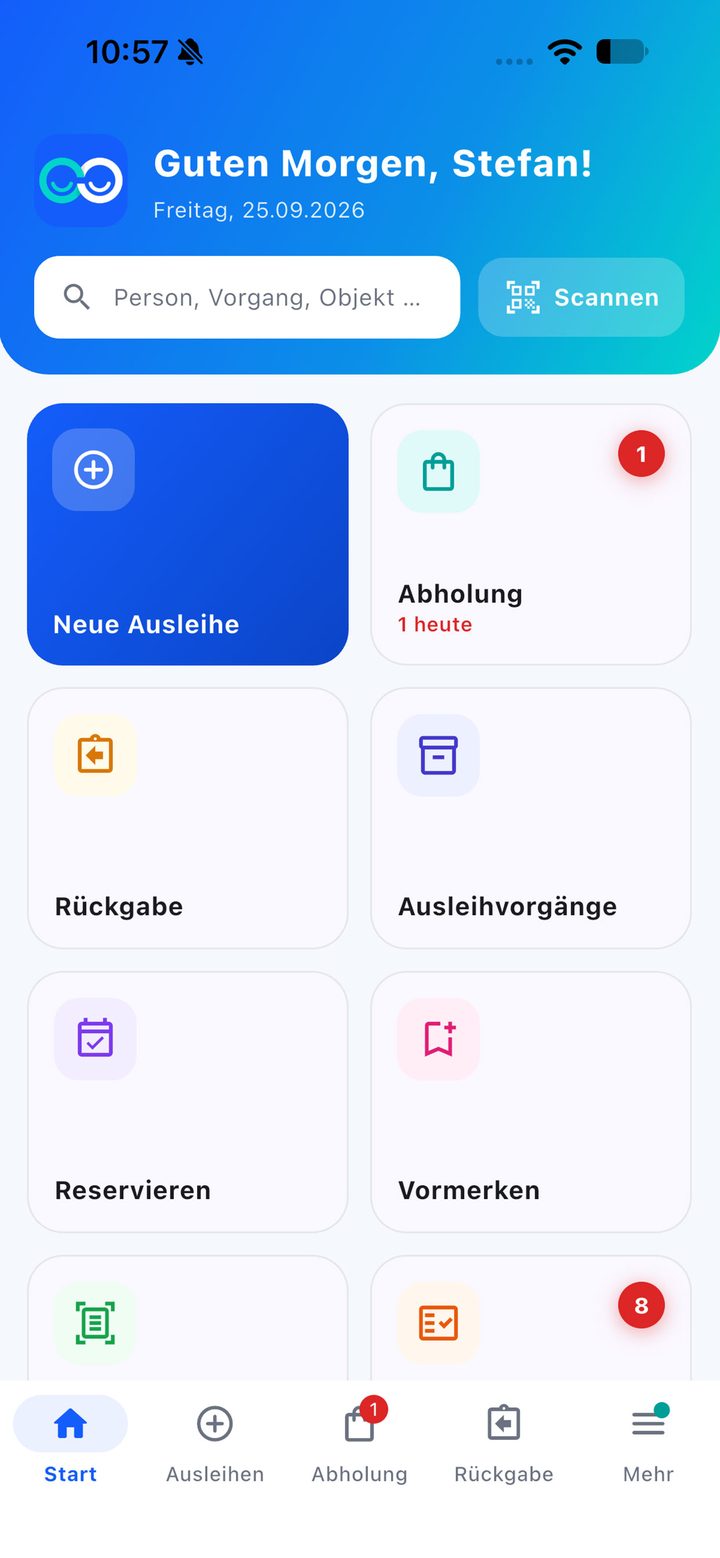
Home screen of the depositoo app with search, scan button and tiles for new loan, pick-up, return, loan transactions, reserve and hold

Built for the counter

One scan for everything

The camera recognises what you show it — and jumps to the right place.

Scan instead of search

A request’s pick-up QR code, a lending card, the QR code on a loan confirmation or an item barcode: one scan opens the request, person, transaction or item — with the matching actions such as lending or placing a hold.

Search across everything

One search field for people, transactions and items at once. Under „Zuletzt“ (Recent) you’ll find your latest transactions.

Your home screen

Show and hide tiles as you need them. Counters show today’s pick-ups, overdue transactions and quick adds waiting to be checked.

Lending

Hand-out in a few steps

The same lending core as in the browser — on the device you’re holding anyway.

  • Record the person by lending card, German ID card or by hand
  • Add items by QR label or barcode (EAN, ISBN, UPC, Code 128/39)
  • Lending rules and due date are checked and suggested
  • Tick off accessories, record a deposit, take condition photos
  • Signature right on the screen
  • Hand-out from a request or reservation — already filled in

Navigation

„Start“ · „Ausleihen“ · „Abholung“ · „Rückgabe“ · „Mehr“

Home, lending, pick-up, return and more: the most important routes sit at the bottom, within thumb’s reach. Each area keeps its state when you briefly jump somewhere else. Under „Abholung“ (Pick-up) you’ll find the requests and reservations due to be collected today and soon.

Returns & on the go

Returns, due dates, reminders

Returns with defects

Per item: OK, defective or missing, partial quantities, accessories and photos. If something is on hold, the app shows it in big letters: „Bitte zurücklegen für …“ (Please set aside for …).

Transactions under control

Change the due date, extend, send a reminder, record a loss, add a photo — right in the transaction. Reservations and holds can be made at the counter too.

Manual reminders

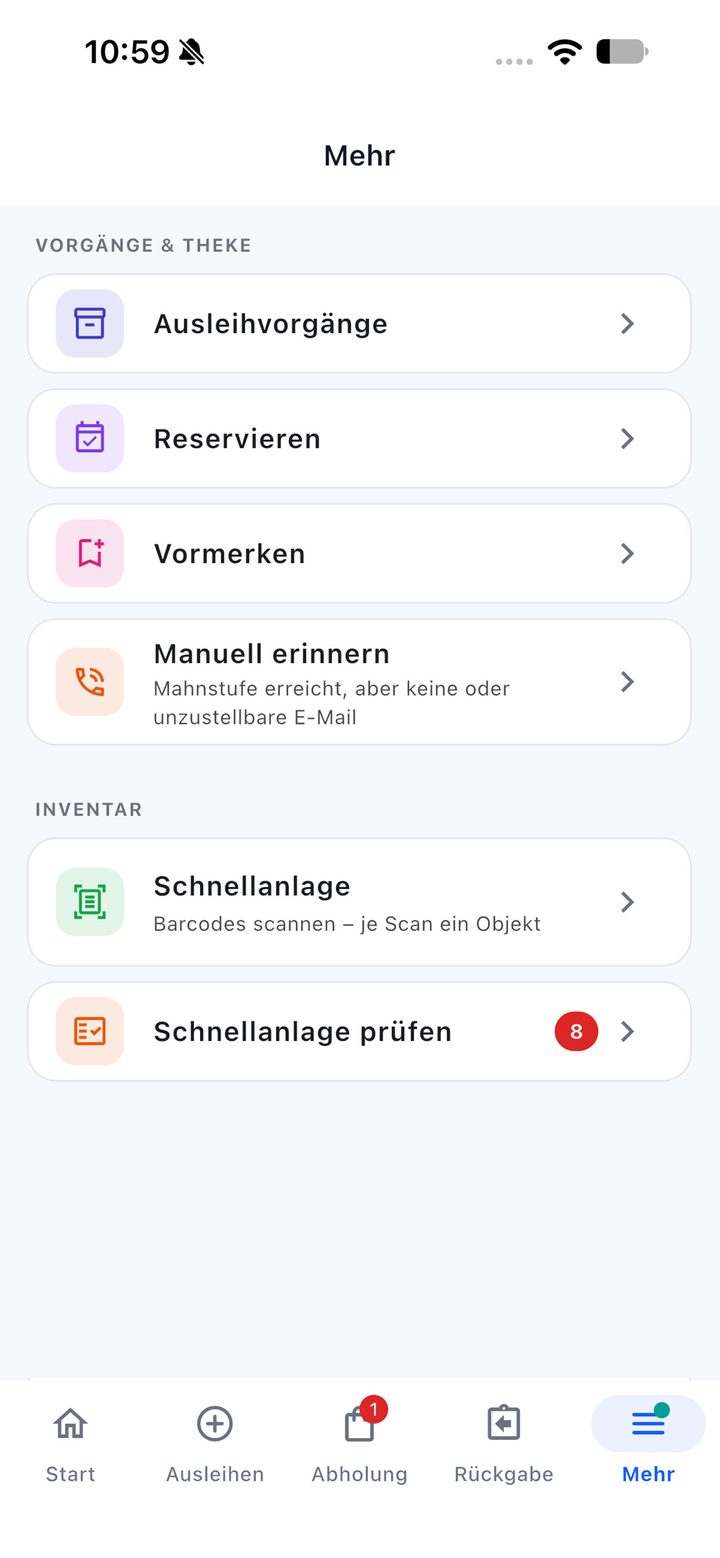
Anyone without an email address, or with one that can’t be delivered to, appears in a separate list — with their phone number, so you can call them straight away.

The „Mehr“ (More) menu of the depositoo app with loan transactions, reserve, hold, manual reminders, quick add and check quick adds

Inventory & storage

Record stock as you walk past

  • Quick add: choose a category, scan barcodes one after another — with a sound and vibration for each scan. depositoo fills in the title and image in the background; afterwards you check the list.
  • With the Equipment & storage module: scan a storage location, put items away, goods receipt and stocktaking in continuous scan mode, move individual units or send them for maintenance, pack and receive transports, keep due inspections in view.
  • Notifications: the bell shows what’s coming up — and, if you like, sends a notification to your device when a new request comes in.
  • Permissions per role: the app shows everyone exactly the tiles and actions their role allows.

FAQ

Frequently asked questions about the app

Where can I get the app?

On the App Store for iPhone and iPad and on Google Play for Android. Download it for free and log in with your depositoo account.

Do I need a new account?

No. The app uses your existing depositoo account with your team, your plan and your permissions. Everything you create in the browser is also in the app.

Is the app available in English?

The apps for iOS and Android are currently available in German only. The web app in the browser is available in English, German, Dutch, Italian, French and Spanish.

Is the app also available for Android?

Yes, on Google Play. On any other device, depositoo runs fully in the browser, including on your smartphone.

Can I get started right now?

Yes. depositoo already runs in the browser on PC, tablet and smartphone – with a focus mode for handing out items. Sign up for free and get going.

More about depositoo

In the browser and in the app.

Set up your team for free and take it with you in the app — to the counter, into the storeroom and on the go.