depositoo app
Now available as an app
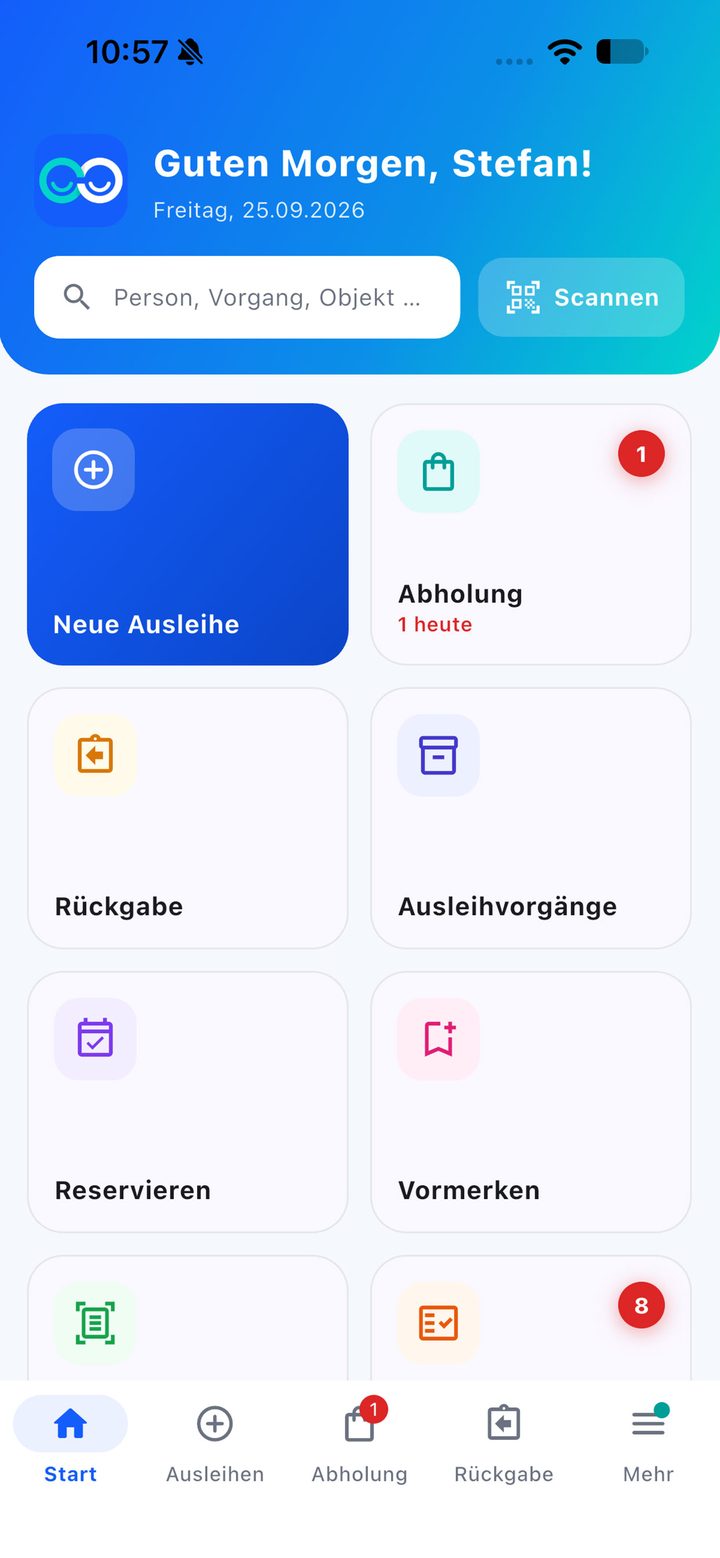
One scan for everything, lending and returns at the counter, pick-ups, quick add and storage — with your existing depositoo account.
depositoo
Do you lend out devices, materials or equipment? With depositoo you record who has what — in just a few steps, with a digital signature and confirmation by email. And you always know what has come back.
30 transactions per month and 50 inventory items for free. The web app is available in English and five other languages; the mobile apps are currently in German only.
How it works
A wizard guides you through every transaction — at your desk or on a tablet right at the hand-out point.
Take a photo of the ID card (German or Dutch) and the details are recognised automatically. Or scan the QR code on a lending card. Or enter the details by hand.
Add items by search, QR label or barcode and set the quantity. depositoo checks availability and your lending rules and suggests the due date.
The borrower accepts your loan agreement — including the category’s additional terms — with a digital signature. For quick direct hand-overs there’s the manual hand-out without signature.
The loan confirmation is created as a PDF and, if you like, sent straight out by email — with a QR code that finds the transaction instantly on return, and the due date as a calendar entry.
And back again
Scan the QR code on the confirmation and you’re there: mark each item as fine, defective or missing, record partial returns, tick off the accessories and capture the condition with photos. Return the deposit or keep part of it. If the item is on hold, depositoo shows straight away who it should be set aside for. The return confirmation comes as a PDF and by email.
All about lending & returns →Features
No more scraps of paper, Excel lists and the question “Who actually has the projector?”
Photograph the front and back of the ID card and the personal details are filled in automatically. German and Dutch ID cards are supported.
More about the ID scan →Store your lending terms in a long and a short version and add your own additional terms per category. Signing happens right on the screen; the exact wording is saved with the transaction.
More about lending & returns →Loan periods per category or item, opening hours and public holidays. depositoo reminds people before the due date and sends overdue reminders in levels you define yourself — bundled into one email per person.
More about due dates →Reservations for a time period with a real availability check and an occupancy timeline. If something is on loan, the next person goes on the waiting list and moves up automatically when it’s returned.
More about reservations →People who borrow often get a lending card with a QR code — next time, one scan is enough. In the customer portal „Meine Ausleihen“ (My loans) they can see their due dates and extend loans themselves.
More about customers →depositoo checks the maximum number of loans, minimum age and blocks when lending. Lending and late fees, damage and deposits are recorded — payment is made on site.
More about lending rules →Due today, overdue, ready for pick-up, manual reminders: the dashboard shows what’s on today. Plus open requests, faulty returns and outstanding fees — with a quick start for lending and returns.
Loan and return confirmations are created automatically as PDFs and can be emailed straight to the borrower — automatically if you like, with a calendar entry for the return.
Five ready-made roles, from administration through storage and counter to specialist department and helper – or your own roles with your own permissions. Responsibilities per site and category: everyone sees everything but only edits their own area. Helpers, for example, see only the name instead of the contact details.
New: NFC tags
NFC tags on items, kits, storage locations and lending cards: a tap with a smartphone or a USB reader works just like a QR scan – included in all plans.
More about NFC →Create your own attributes and categories
Your stock — neatly sorted, described and labelled.
Choose a category and scan barcodes one after another — with the camera or a handheld scanner. For ISBN and EAN, depositoo fills in title, description and image wherever the open book and product databases know them. New items land in a review list.
Every item gets a name, description, image and a unique code. You keep quantities separately as fine, defective, lost and sold — so you know what can really be lent out.
Categories with subcategories and their own attributes (number, price, date, text, file). For each category you also set the loan period, deposit, additional terms for the loan agreement and the default label.
QR labels as PDF — for one item, a selection or all filtered items. Start with a template or create your own designs with text, logo and QR code.
Bring in existing lists as CSV or Excel: depositoo suggests the column mapping, shows a preview and, if you like, creates missing categories and fields at the same time.
Define for each item what belongs with it — power supply, bag, remote control. It’s ticked off at hand-out and return; if anything is missing, the return is automatically marked as defective.
Lending shop
Activate your public lending shop with its own address. Interested people choose a time period, see straight away what’s available then, and send their request.
Handling requests
depositoo notifies your team of new requests by email. You check availability, reply using templates and accept, decline or ask a follow-up question. At pick-up you scan the QR code from the email — and the loan is already filled in with the person, items and due date.
Equipment & storage module FROM TEAM PLAN
Several storerooms, trade fairs, projects, equipment that needs regular inspection? The module extends depositoo with everything companies and event teams need — at no extra cost from the Team plan.
Storage locations as a tree with QR codes, stock per location, goods receipt, relocation and stocktaking by scan — all in the movement log.
Every device with its own QR code, serial number, status and history. The scan hands out exactly that unit.
Material list with availability, request by the specialist department, approval by the storeroom, hand-out to the event.
Packing list as PDF with QR codes, packing and receiving by scan, „Unterwegs“ (In transit) in view, shortfalls can be booked later.
Inspection interval by days or uses, report with file attachment, block when an inspection is due.
The bell reports due inspections, low stock and open transports — as a morning summary if you like.
depositoo app
One scan for everything, lending and returns at the counter, pick-ups, quick add and storage — with your existing depositoo account.
Who is it for?
From the clubhouse to the company storeroom — depositoo adapts to your stock.
Lend tents, beer tent sets (tables and benches), jerseys, sports equipment and technical gear to members — with a lending card and an online catalogue.
Learn more →For companies, political parties and associations: hand out roll-up banners, gazebos and counters to teams or local branches.
Learn more →Hand out tools, measuring instruments and IT to employees — with serial numbers, storage locations and inspection intervals.
Learn more →Lend tablets, cameras, sports and teaching materials to teachers and students.
Learn more →Online catalogue, a lending card just like at the library, and returns with a condition check.
Learn more →Lend beer tent sets (tables and benches), projectors or a play bus to residents and groups.
Learn more →Sustainable
Much of what people need is already there — in the clubhouse, the school basement, the company storeroom or at the town hall. depositoo makes visible what exists and when it’s free. That way existing equipment gets used more often instead of being bought twice: it saves money and conserves resources. For political parties and local branches just as much as for libraries of things.
Data protection & security
Lending means processing personal data. depositoo helps you do it in line with the GDPR.
You conclude the data processing agreement (DPA) right in depositoo — no paperwork. View template
Decide after how many days transactions are deleted following the return — or when a loan is overdue.
Two-factor authentication with an authenticator app, protection against repeated failed attempts and an overview of your logged-in devices and recent activity.
Each organisation works in its own area. With roles and permissions you control who may do what — and who can see contact details at all.
Pricing
Start for free. When your stock grows, choose a fixed plan — with all features and unlimited users.
Free
€0
30 transactions per month
50 items
Start
€9
per month
250 items
Team
€24
per month
1,000 items
Pro
€49
per month
5,000 items
Unlimited transactions on all paid plans · Equipment & storage module from Team · 30% discount for non-profits · plus VAT
FAQ
A web app for anyone who lends out things: you manage your inventory, record loans with a digital signature, send confirmations by email and keep track of returns and defects. Optionally, you can take requests through a public lending shop.
The depositoo web app is available in English, German, Dutch, Italian, French and Spanish — everyone on the team picks their own language. The apps for iOS and Android, emails, PDF documents, the public lending shop and the customer portal are currently in German only.
The Free plan includes 30 transactions per month and 50 inventory items at no cost. If you need more, there are fixed plans from €9 a month (plus VAT) with unlimited transactions — non-profit organisations get a 30% discount. All prices
No. For each transaction you choose between „Mit Unterschrift“ (With signature) and „Manuelle Ausgabe“ (Manual hand-out) without signature. Whether a signature is also required on return is a setting for your organisation.
German and Dutch ID cards. You can skip the scan at any time and enter the details by hand — or load a regular customer via their lending card.
Yes. Import your list as CSV or Excel (XLSX/XLS). depositoo suggests the column mapping, shows you a preview first and skips faulty rows. Existing items are updated via their code.
You mark the item as defective and describe the defect, with a photo and damage fee if you like. The transaction gets the status „Mangelhaft“ (Defective) and appears on the dashboard among the faulty returns until you’ve resolved it.
Yes, if you switch it on. Every loan gets a due date; depositoo reminds people beforehand and sends overdue reminders in levels you define. Anyone without an email address appears in the „Manuell erinnern“ (Manual reminders) list. More about due dates
Yes, on the App Store for iPhone and iPad and on Google Play for Android — with your existing account. On all other devices depositoo runs fully in the browser, including on your smartphone. The mobile app is currently available in German only. More about the app
For companies, clubs, schools, municipalities and other institutions, as well as self-employed professionals. It is not intended for use by consumers. People who borrow from you don’t need an account.
Create your free account and set up your first transaction in just a few minutes.